_RGB_web.png?width=268&height=150&name=LOGO_IMS_Primary-Safe-Vector_120424%20(1)_RGB_web.png)
1. Emails That Should Be Logged
 Customer‑Facing Emails
Log any email where a customer is in the To/CC line.
Examples:
-
Product questions
-
Pricing discussions
-
Order updates
-
Issue resolution
-
Follow‑ups or check‑ins
2. Emails That Should Not Be Logged
✘ Internal‑Only Emails
Emails involving only IMS employees.
Examples:
-
Peer‑to‑peer questions
-
Internal planning
-
“What do you think about this?”
-
“Can someone help with this?”
✘ HR, Personnel, or Sensitive Topics
Never log these under any circumstances.
3. Gmail Logging Requirements
Because Gmail logging is controlled by the HubSpot extension, users must verify logging settings before sending.
Step 1: Check Whether “Log” Is Selected
-
Customer‑facing email: Log should be checked
-
Internal email: Log must be unchecked
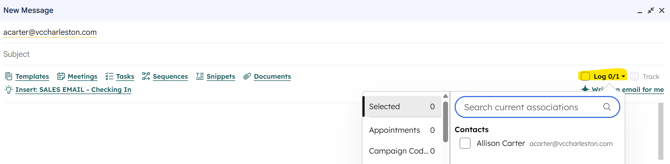
Step 2: Confirm Where the Email Will Be Logged
Gmail displays the HubSpot records the email will attach to (Contact, Company, Deal, Ticket, etc.).
This prevents:
-
Internal emails from being logged
-
Emails attaching to the wrong record
-
Timeline clutter
Summary
-
Log only customer‑facing communication
-
Keep internal and sensitive emails out of HubSpot
-
Gmail users must verify logging settings before sending